
BTM-2026 AutoScoring Edition
The best advanced bowling tournament management software for automatic scoring back office management at the bowling center, supporting both scores and financials, with integration of Brackets.
BTM-2026 AutoScoring
BTM-2026 AutoScoring promotes the best advanced tournament management software for Windows integrated with automatic scoring system back offices at the bowling center. CDE Software uses its over 40 year experience with bowling software to provide the most comprehensive and best tournament software in the industry that is powerful, yet easy to use. This edition expands on our BTM-2026 Professional edition features and integrates with popular electronic scoring systems in our Automatic Scoring Partner List. This edition is not for home use.
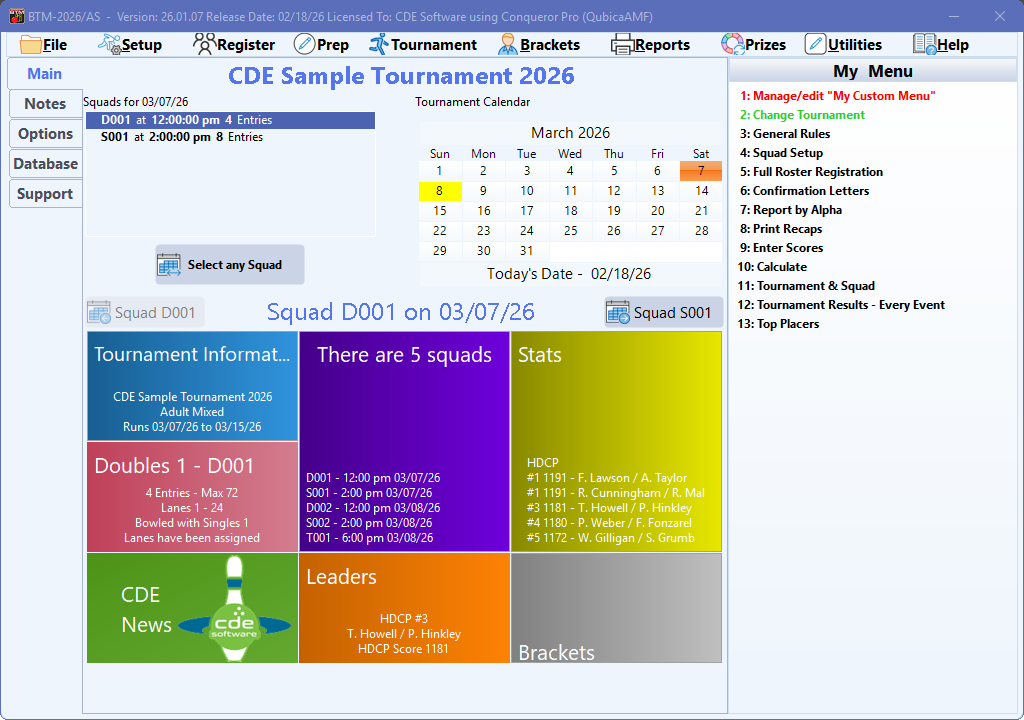
Designed to be easy to use by everyone
Easy navigation to get at functions, organized in a manner that follows the tournament process.
Tournament
Run as many scratch or handicap tournaments on your computer as you wish. Tournaments can be men, women, boys, girls, adults only, youth only or adult and youth. Bowl up to 6 different events, made up of singles, doubles, trios and/or teams. Each event can have up to 6 games. Four All-Event categories are available that will combine scores from bowled events.
Financials
Built-in financial module to manage finances for the tournament.
USBC/CTF/TNBA Support
Supports and is recommended by the United States Bowling Congress, Canadian Tenpin Federation and The National Bowling Association for the 2025/26 bowling season.
Reports
Flexible reports and tournament results. Embellish reports with logos, different fonts and other ways to distinguish your tournament from others.
Scoring System Integration
We offer different connections with BTM and the scoring system at the bowling center. BTM easily integrates within the back office to manage tournaments and send squads to the front desk to be floored at squad time and then retrieve scores tracked by the scoring system
Bracket Sidepots
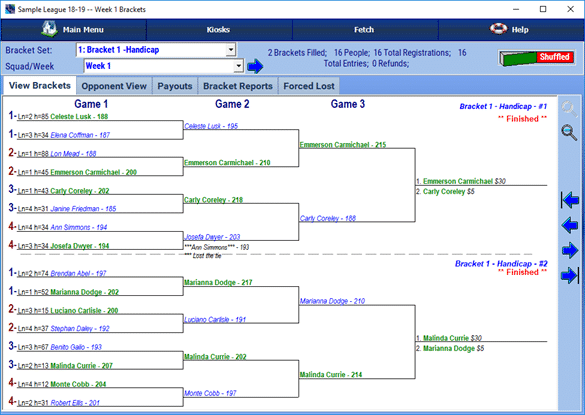
Add some interest during tournament play by offering bracket sidepots with the integrated bracket module. Random shuffle bowlers and display payouts and alive lists.
Upload Results For Your Bowlers To View Online
BTM-2026 uploads league standings to personal websites are also supported for standings uploading.
Check-in Sheets and Recaps
BTM-2026 provides squad check-in sheets and ability to print recap sheets for the squad on plain paper or preprinted recap sheets.
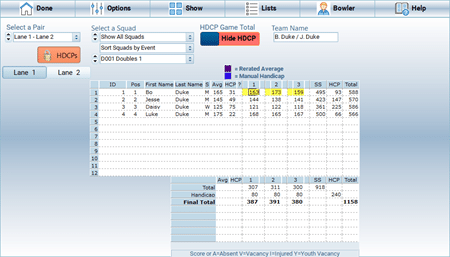
Easy Score Entry
Rapidly enter scores using the keyboard. Bowlers can be moved using mouse or keyboard shortcuts. Easy handling of absentee, vacancy and injured scores.
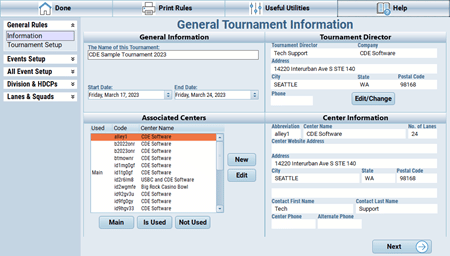
Flexible Rules Configuration
While tournaments are simpler than leagues, there are variations in tournaments, such as handicap calculations and divisions layout. BTM-2026 offers a logically organized configuration screen to configure the tournament rules.
Try BTM-2026 For Free!
The software will run in Demo Mode allowing you to check out the sample tournament and check out most program features. Purchase from our online store when ready or call our sales department to place the order by phone.
The primary installer for the BTM-2026 Standard, Professional, and AutoScoring editions of the bowling tournament manager software is now available. Whether you've purchased BTM-2026 or are interested in trying a free demo, this installer serves your needs. It also updates existing installations of BTM-2023 to the latest release.
Supported Editions:
- BTM-2026 Standard
- BTM-2026 Professional
- BTM-2026 AutoScoring
This installer includes the necessary files for all editions of BTM-2026. It ensures that you have access to the features and functionalities specific to your chosen edition.
Supported Operating Systems: Windows 11, Windows 10, Windows Server 2022, Windows Server 2019, Windows Server 2016, and Windows Server 2012. Both 32-bit and 64-bit versions of these operating systems are supported.
Please note that Bowling Tournament Manager (BTM) 2026 is designed to streamline the management of bowling tournaments across different levels of play. It offers a range of features tailored to meet the needs of tournament organizers, including scheduling, participant management, scoring, and more.
To download the BTM-2026 installer or for more information, please visit our website or contact our support team. Whether you're organizing a small local tournament or a large-scale event, BTM-2023 provides the tools you need to make your tournament a success.
To download this installer, simply click the green download button provided. If prompted to save or run the file, select "Save." Once the download is complete, locate the downloaded file and run the installer by double-clicking on it. Follow the on-screen prompts to complete the installation process.
If you encounter any issues during the download or installation process, please feel free to reach out to our support team for assistance.
Operating Systems Supported: Windows 11, Windows 10, Windows 2022 Server, Windows 2016 Server and Windows 2012 Server. Supports 32 bit and 64 bit versions of these operating systems.
Note: While installation and operation may work with Windows 8.1, Windows 7 or Windows Server 2008 R2, this operation is no longer supported by Microsoft or officially supported/tested by CDE.
- Version 26.03.03
- Updated 09-22-2026
- Size 92.5 MB
- MD5 FEC5A206D518E871E648FBAA3FECBF0E
- History Click to View
- EULA Click to View
- Install Guide Click to View
- Purchase Click toPurchase
- Instructions How to Download
- Download
Additional Product Details
- About
- Features
- General Features
- Additional Features
- USBC, CTF and TNBA Support
- Reports
- Internet Features
- Financials
- Brackets
- Master Bowler Database
- AutoScoring Interface
- System Requirements
BTM-2026 AutoScoring is our popular edition for management of bowling tournaments at bowling centers with compatible electronic scoring editions. This edition is part of our industrial products, which are editions used only at the bowling center and integrate with a specific scoring system. Tournament managers at home needing the consumer edition that can be used at home will need the BTM-2026 Professional or Standard Edition product.
BTM-2026 AutoScoring is designed to make your work easier and enjoyable to where you will always want to be the tournament manager. The United States Bowling Congress (USBC) is supported along with the Canadian Tenpin Federation (CTF) and The National Bowling Association (TNBA) and includes forms, sanctions, membership cards & awards for use in the 2025/2026 bowling season.
BTM-2026 manages multi-event tournaments that feature singles, doubles, trios or team events. BTM-2026 also manages all-event entries.
BTM-2026 features easy and clear menu navigation in a manner organized with how a tournament operates, from setup to finish. Easily navigate between squads.
Many of BTM-2026 features are features CDE and its BTM product line have been doing for years. Such features include:
- Manage as many tournament as you wish on the one computer.
- Authentic support for Microsoft Windows using digitally signed applications for security and authentication purposes which follow software industry standards.
- Built-in tournament treasurer module to manage finances for a tournament.
- Manage men, women, mixed and youth tournaments.
- Tournaments can have up to 12 events, which can be singles, doubles, trios or teams.
- Up to 4 All-Events to combine scores from events ran.
- Support – CDE provides the largest opportunity for support for your program via online chat, message boards, email, fax, mail and phone
- WHY WAIT – When purchasing the software on our online store, the invoice will contain a temporary registration code for you to download and begin using the software FULLY while waiting for the permanent registration code sent the next business day. [Preorders excluded]
- Additional features available beyond what is listed.
A sample of some of our general features include:
Tournament Types:
- Up to 12 events per tournament
- Up to 4 Bowler All-Events per tournament
- Up to 2 Team All-Events per tournament
- Up to 12 games per event.
- Up to 500 squads per tournament
- Bowlers can register into tournament up to 35 times
- Singles Events
- Doubles Events
- Trios Events
- Team Events
- Derived Singles or Doubles events, where scores from a different event also count for the derived event.
- Eliminator Events – Where a cut can be made for advancers.
- Linked Events – Such as Singles and Doubles are linked together where bowlers must bowl both and they bowl back to back.
- Scratch or Handicap Tournaments.
- Bowler Divisions – Based on one or a combination of items, such as gender, average or age.
- Team Divisions – Based on one or a combination of items, such as gender, average or age.
- Men, Women, Boys and/or Girls support.
- Bowl multiple times in an event, limiting the number of times they may be in the top specified places.
- Multiple sets. A 6 game squad could be broken up into two different sets of 3 to bowl in the AM and then the PM.
Handicap Control:
- Game or Series Handicapping
- Divisional handicaps
- Maximum handicap limiting support.
Squad Setup:
- Assignable squad codes.
- Date/time bowled
- Limiting of range of lanes allowed per squad.
- Which squad is linked to bowl next.
Lane Assignments:
- Manually assign to squad and lanes
- Automatically assign to a lane within specified squad.
- Checks to verify bowler isn’t already in a squad or lane.
Additional features include:
Registration:
- Registration screen mimics typical city/state tournament entry forms.
- Easy to register bowlers
- Easy to assign bowling order for multiple player events
- Easy to assign into All-Events
- Confirmation letter generation
Reports:
- Check-in Sheets
- Recap Sheets on blank or preprinted recaps.
- Tournament results
- Event results
- Squad results
- Game and Series Highs
- User definable reports
BTM-2026 supports the USBC, CTF and TNBA for the 2025/26 bowling season with the following features:
- USBC Certified Leagues with award detection and forms, membership forms, sanctions forms and more.
- Playing rule changes.
- CTF awards changes
- Prints TNBA awards
Some of the report features include:
- Tournament results
- Event Results
- Squad Results
- High Scores
- Custom user definable reports
- Check-in sheets
- Add graphics and watermarks from our bowling clipart CD-ROM’s or your own creations. You control size, position and effects
- Fonts customization within multiple reports, changing font style, size and color.
- Print plain paper recaps
- Print on available laser, inkjet and dot matrix printers using forms officially approved by CDE Software with our official recap partner Databar.
Some of the Internet enabled features include:
- Single one-click upload to your websites comes standard with all editions of BTM
- Download program updates from within the program.
- Web uploads – Upload results to your own website
Some of the features for the financial management portion of BTM include:
- Record payments and manage treasurer duties with the built-in treasurer module to manage tournament finances.
- Event fee management
- All-Event fee management.
- Track sponsor money.
- Prize fund calculations.
- Free integrated bracket module to run brackets for your squad(s). [For a dedicated Bracket product solution, checkout TBRAC-2024]
- Use to run brackets for fun, to make additional money for yourself, the tournament, the youth program or your favorite charity.
- USBC allows brackets to be offered for USBC youth tournaments, providing winnings go to scholarship fund.
- Eight different bracket groups can be offered.
- Each bracket group can be either scratch or handicap and can be a different price.
- Each bracket group can either be offered for individual bowlers or teams.
- Each individual or team can be entered up to 99 times for a total of 999 brackets per group.
- New and improved bracket registration screen
Master Bowler Database in BTM-2026 AutoScoring
BTM-2026 AutoScoring comes with a full license for the Master Bowler Database 2026. It’s easy to install and packed with helpful features to make managing your leagues simpler.
New Reports:
-
Access new reports to get valuable insights into your bowlers and leagues.
Import Common Bowlers:
-
Quickly import bowlers into different leagues to keep your data consistent and save time.
Share Bowlers Between Leagues and Tournaments:
-
Easily share bowlers across leagues and tournaments to help administrators stay organized.
Merge Duplicate Bowlers:
-
Combine duplicate bowler records to keep your data clean and accurate.
Multi-League Reports:
-
Generate bowler reports that include information from multiple leagues.
Mailing Labels:
-
Quickly create mailing labels to make communication with bowlers simple.
Average Books:
-
Create average books from your leagues for a handy reference.
Call Lists:
-
Generate call lists to make league communication fast and easy.
Import and Export with Bowler TRAC:
-
Seamlessly move bowler data between BTM-2026 AutoScoring and Bowler TRAC for easy data sharing.
The Master Bowler Database makes league management more organized, efficient, and insightful for every league secretary!
BTM-2026 AutoScoring – Compatible with Many Scoring Systems
BTM-2026 AutoScoring works with a wide range of automatic scoring systems, making it easy to integrate into your bowling center. Whether you’re using a new system or an older one, we’ve got you covered!
Certified Scoring Systems:
-
QubicaAMF Conqueror X & Pro
-
AK Microsystem Touchdesk
-
Brunswick Sync, Vector Plus, and Vector
-
Steltronic Focus
-
US Bowling Pulse
Non-Certified Scoring Systems:
- Brunswick CenterMaster
-
Computerscore Matrix (formerly Vantech or Ebonite)
-
Joystick Front Desk
-
Mendes
-
Purrfect Desk
-
QubicaAMF BOSS 8.3 and 9.x
-
Brunswick Classic
-
Switch
-
Twelve Strike Central Desk PRO
-
Viking 2001
Older Systems:
If you have older systems like AMF Accuscore, Accuscore Color, Accuscore Plus, or Brunswick AS80/AS90, you can replace the front desk console with a solution from our partners (like AK Microsystems Touchdesk) to make it work.
Our certified systems go through careful testing to make sure they integrate smoothly. Non-certified systems should still work well, but they might need a bit more checking and support.
If you have questions about connecting BLS-2026 AutoScoring with a scoring system, contact our automatic scoring division. We’ll help you find the right system that fits your business and budget!
Make sure your computer is ready so you can run BTM-2026 smoothly for the Fall 2025 through Summer 2026 season.
Operating System
Works on Windows 11, Windows 10, and Windows Server 2022, 2019, 2016, and 2012.
Supports both 32-bit and 64-bit systems on Intel and AMD processors.
Windows 8.1 may work, but it is not officially supported.
Hard Drive Space
You will need about 150 to 200 MB of free space.
Installation may need an extra 95 MB if required components are not already installed.
Display
Minimum screen resolution of 1024 by 768 or higher.
Color setting above 256 colors, with 16-bit or higher recommended.
At least 32 MB of graphics memory.
Display Settings
Use standard small fonts at 100 percent for best results.
Processor
1.4 GHz or faster.
Memory (RAM)
At least 2 GB recommended for smooth performance.
Optical Drive
Only needed if installing from a CD or DVD.
USB Port
Not required for normal use.
Printer
A printer or printer driver must be installed for reports and forms.
Mouse
A standard mouse or similar pointing device.
Software Needed
Adobe Acrobat Reader 9.0 or newer for viewing and printing PDF files.
Internet connection for updates and online features.
AutoScoring Setup
Requires installation or network connection to a compatible scoring system.
Meeting these requirements will help ensure a smooth setup and a reliable experience with BTM-2026 AutoScoring.
Pricing
Call or visit our online store to request a quote
All upgrade orders are manually verified for eligibility. If the software was transferred to you by a previous user, a Transfer of Ownership form, from our support section, must be completed, signed and returned to CDE Software before order can be processed.